Smart Pipeline Connections
Haystack pipelines support smarter connection semantics that reduce boilerplate and make pipeline definitions easier to read and maintain. These features focus on simplifying how components are connected, without changing component behavior.
Smart connections help eliminate common glue components such as Joiners and OutputAdapters in many pipelines.
Implicit List Joining
Pipelines natively support connecting multiple component outputs directly to a single component input, without requiring an explicit Joiner component.
This works when:
- All connected outputs are compatible list types.
- The target input accepts a list of the same type, for example
list[Document].
When multiple outputs are connected to the same input, the pipeline implicitly concatenates the lists from the outputs into a single list for the input.
Example
Multiple converters can write directly into a single DocumentWriter without using a DocumentJoiner:
Expand to see the pipeline graph
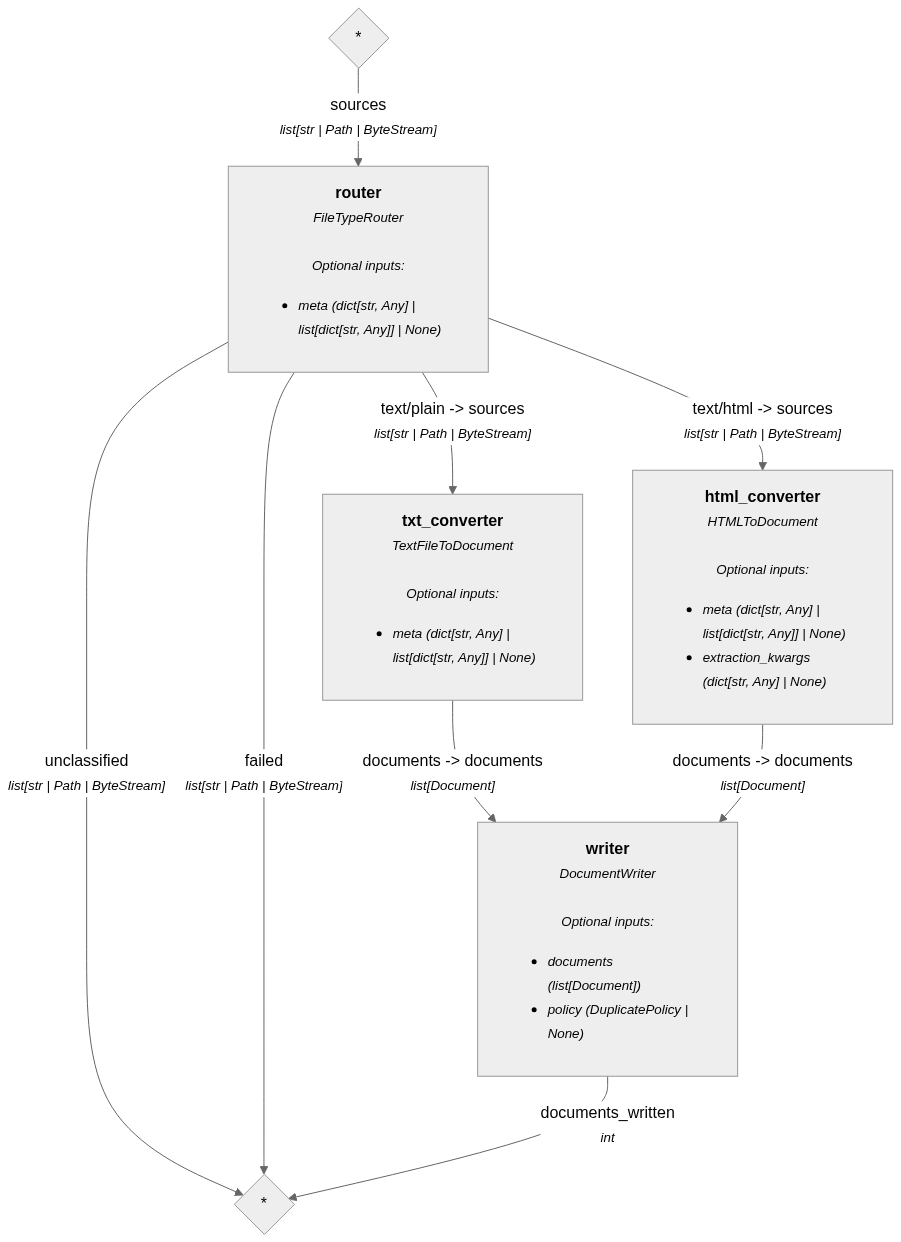
from haystack import Pipeline
from haystack.components.converters import HTMLToDocument, TextFileToDocument
from haystack.components.routers import FileTypeRouter
from haystack.components.writers import DocumentWriter
from haystack.dataclasses import ByteStream
from haystack.document_stores.in_memory import InMemoryDocumentStore

sources = [
    ByteStream.from_string(text="Text file content", mime_type="text/plain"),
    ByteStream.from_string(text="<html><body>Some content</body></html>", mime_type="text/html"),
]

doc_store = InMemoryDocumentStore()

pipe = Pipeline()
pipe.add_component("router", FileTypeRouter(mime_types=["text/plain", "text/html"]))
pipe.add_component("txt_converter", TextFileToDocument())
pipe.add_component("html_converter", HTMLToDocument())
pipe.add_component("writer", DocumentWriter(doc_store))
pipe.connect("router.text/plain", "txt_converter.sources")
pipe.connect("router.text/html", "html_converter.sources")
pipe.connect("txt_converter.documents", "writer.documents")
pipe.connect("html_converter.documents", "writer.documents")

result = pipe.run({"router": {"sources": sources}})
This pattern is especially useful when routing files, documents, or results across multiple parallel branches.
Flexible Type Connections
To further streamline pipeline definitions, Haystack pipelines support limited implicit type adaptation at connection time.
This makes pipeline connections more flexible and reduces the need for OutputAdapter components.
Supported adaptations
| Source Type | Target Type | Behavior |
|---|---|---|
str | ChatMessage | Wrapped into a ChatMessage with user role. |
ChatMessage | str | Extracts ChatMessage.text; raises PipelineRuntimeError if None. |
T | list[T] | Wraps the item into a single-element list. |
list[str] or list[ChatMessage] | str or ChatMessage | Extracts the first item; raises PipelineRuntimeError if the list is empty. |
All adaptations are checked at connection time to ensure type safety, but applied at runtime during pipeline execution.
When multiple connections are possible, strict type matching is prioritized over implicit conversion. This preserves backward compatibility with earlier versions of Haystack, where flexible type connections were not supported.
Example
Pipeline connecting the Chat Generator messages output (list[ChatMessage]) to the retriever query input (str)
without using an OutputAdapter:
from haystack.document_stores.in_memory import InMemoryDocumentStore
from haystack.dataclasses import Document
from haystack.components.retrievers import InMemoryBM25Retriever
from haystack import Pipeline
from haystack.components.builders import ChatPromptBuilder
from haystack.components.generators.chat import OpenAIChatGenerator

document_store = InMemoryDocumentStore()

documents = [
    Document(content="Bob lives in Paris."),
    Document(content="Alice lives in London."),
    Document(content="Ivy lives in Melbourne."),
    Document(content="Kate lives in Brisbane."),
    Document(content="Liam lives in Adelaide."),
]

document_store.write_documents(documents)

template ="""{% message role="user" %}
Rewrite the following query to be used for keyword search.
{{ query }}
{% endmessage %}
"""

p = Pipeline()
p.add_component("prompt_builder", ChatPromptBuilder(template=template))
p.add_component("llm", OpenAIChatGenerator(model="gpt-4.1-mini"))
p.add_component("retriever", InMemoryBM25Retriever(document_store=document_store, top_k=3))

p.connect("prompt_builder", "llm")
# implicitly converts list[ChatMessage] -> str
p.connect("llm", "retriever")

query = """Someday I'd love to visit Brisbane, but for now I just want
to know the names of the people who live there."""

result = p.run(data={"prompt_builder": {"query": query}})
When You Still Need Joiners or OutputAdapters
Explicit Joiners or OutputAdapters are still useful when you need:
- Custom aggregation logic beyond simple list concatenation
- Type conversions not covered by implicit adaptation
- Explicit control over formatting or ordering
Smart connections reduce the need for glue components, but they do not remove them entirely. When in doubt, explicit components provide clarity and more control.